
AWS Favicon Updater for Chrome & Firefox
Overview
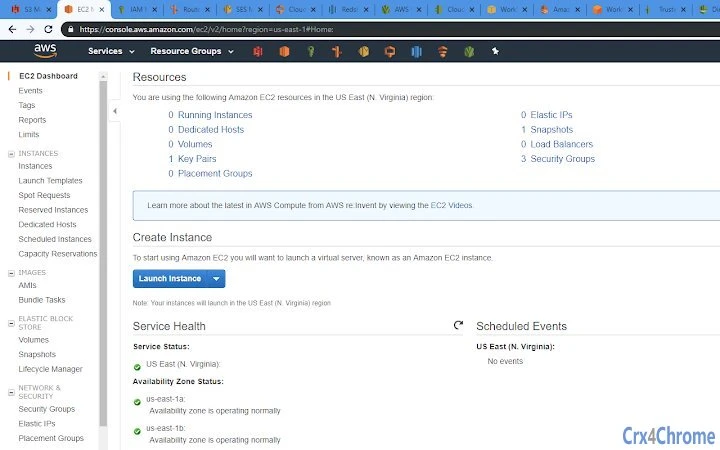
El AWS Favicon Updater es una extensión ligera para el navegador diseñada para desarrolladores e ingenieros de nube que gestionan múltiples pestañas de servicios de AWS simultáneamente. Aborda un desafío común: distinguir entre los paneles de control de los servicios de AWS cuando hay numerosas pestañas abiertas, ya que la mayoría utilizan íconos predeterminados similares o genéricos. Al aplicar automáticamente favicons precisos y visualmente distintos a más de 100 servicios de AWS, la herramienta mejora la navegación visual y reduce la carga cognitiva durante flujos de trabajo complejos. La extensión es particularmente útil en entornos de alta productividad donde los usuarios interactúan con servicios como S3, EC2, Lambda, RDS e IAM en múltiples ventanas del navegador.
Dirigida a profesionales que trabajan extensamente con AWS, la herramienta soporta una organización eficiente de pestañas sin requerir cambios en los flujos de trabajo existentes. Es ideal para ingenieros DevOps, arquitectos de nube y administradores de sistemas que dependen de las consolas de AWS basadas en el navegador. La extensión opera de forma pasiva, aplicando favicons según patrones de URL, garantizando que no haya interrupciones en las tareas en curso. Su diseño no intrusivo permite a los usuarios mantener el control total de su experiencia de navegación mientras obtienen una mejor visibilidad de las pestañas.
Desarrollada por JB4GDI, la extensión es de código abierto y está alojada en GitHub, promoviendo la transparencia y las contribuciones de la comunidad. El desarrollador también ha creado herramientas complementarias, como la extensión AWS Region Color Highlights, lo que indica un enfoque en mejorar la usabilidad de la consola de AWS. La extensión es gratuita y no recopila historial de navegación, enfatizando la privacidad y la seguridad.
Key Features & Capabilities
- Automatic Favicon Assignment – Detects AWS service URLs and applies the correct favicon in real time, eliminating visual confusion across tabs.
- Over 100 Pre-Configured Favicons – Includes official AWS service icons for major services such as S3, EC2, Lambda, RDS, CloudFront, and IAM.
- Privacy-First Design – Does not access or store browsing history, ensuring user data remains secure and private.
- Open-Source Codebase – Available on GitHub, allowing transparency, community contributions, and auditability.
- Cross-Browser Compatibility – Supports both Chrome and Firefox, enabling consistent functionality across major platforms.
Users benefit from faster tab identification during troubleshooting, deployment, or monitoring tasks. For example, a DevOps engineer managing a multi-region deployment can instantly identify which tab belongs to a specific service, reducing the risk of accidental configuration changes. The extension integrates seamlessly into existing workflows without requiring manual configuration or user input. Future updates are expected to expand the list of supported services, with the developer indicating ongoing development.
User Interface, Workflow & Performance
The AWS Favicon Updater operates entirely in the background with no visible UI elements or configuration panels. It functions automatically upon installation, applying favicons based on URL patterns without user intervention. This minimal interface ensures it does not clutter the browser’s toolbar or interfere with the user’s workflow.
Navigating between AWS service tabs is streamlined, as each service now displays a unique, recognizable icon. The workflow remains unchanged—users open tabs as usual, and the extension handles the rest. There is no noticeable delay or performance impact reported, though exact resource usage details were not specified. The extension is lightweight at 2.3 MB, suggesting efficient memory usage.
Stability is expected to be high, given its passive operation and lack of complex processing. Since it does not interact with browsing history or sensitive data, the risk of crashes or conflicts is minimized. The developer did not provide additional system requirements or performance benchmarks, but the extension’s design implies low CPU and RAM consumption typical of lightweight browser tools.
Compatibility & System Requirements
The extension is compatible with Chrome and Firefox browsers, supporting both desktop platforms. The version number is 1.0.0, released on May 15, 2024. The installation size is 2.3 MB, which is typical for browser extensions of this nature.
Exact system requirements were not listed. Compatibility with specific OS versions or hardware configurations is not specified. However, since it is designed for modern web browsers, it is likely to function on current versions of Windows, macOS, and Linux systems that support Chrome and Firefox. The developer did not provide information on minimum CPU, RAM, or storage needs.
Pros and Cons
Pros
- Automatically enhances tab visibility with accurate AWS service icons
- Over 100 favicons included, with ongoing updates planned
- Privacy-focused—does not access browsing history
- Open-source and transparent, hosted on GitHub
- Lightweight at 2.3 MB with minimal performance impact
Cons
- No user interface for customization or settings
- Only supports AWS services—limited to cloud console use
- Compatibility with older browser versions not confirmed
- No built-in update notifications or changelog visibility
- Dependent on URL patterns, which may fail if AWS changes service URLs
FAQ Section
Is the AWS Favicon Updater safe to use?
Yes, the extension is designed with privacy in mind. It does not read or store browsing history, and all code is publicly available on GitHub for review.
Does this extension work on all AWS services?
It supports over 100 AWS services, with more being added. However, it relies on URL patterns, so it may not work if AWS changes the structure of a service’s console URL.
Can I customize the favicons or add my own?
Currently, the extension does not provide a user interface for customization. However, since the code is open-source, users with development experience can modify and rebuild the extension.
Is the extension free to use?
Yes, the AWS Favicon Updater is completely free. There are no paid features or subscriptions.
How do I update the extension?
Updates are automatically handled by the browser’s extension store. Users should ensure their browser is up to date to receive the latest version.
Final Thoughts
The AWS Favicon Updater delivers a simple yet powerful solution for developers overwhelmed by multiple AWS service tabs. Its ability to instantly differentiate services through accurate, official favicons significantly improves workflow clarity and reduces errors. The privacy-first approach and open-source nature add trust and transparency, making it a reliable choice for professionals.
While it lacks customization options and is limited to AWS services, its focused design ensures high efficiency within its scope. The extension is ideal for cloud engineers, DevOps teams, and anyone who spends significant time in the AWS console. With no cost and minimal overhead, it offers immediate value.
Download AWS Favicon Updater now and transform your tab management experience.







